Ableton Live’s native MIDI mapping only lets you trigger minimum and maximum values with buttons — jumping to specific intermediate values like -6.5dB or 50% isn’t possible. The Trigger Specific Values via MIDI Controller pack solves this with Max for Live devices that store up to 30 custom parameter values per device, each recallable instantly with a single button press.
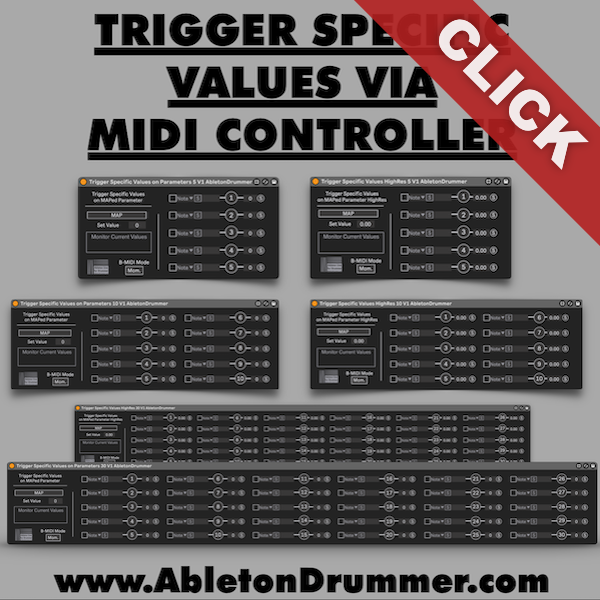
How to Trigger Specific Values via MIDI Controller
Create a MIDI track, load one of the devices, and route your controller into that track with Monitor set to “In.” Click Map and select any Ableton parameter — volume faders, filter cutoffs, effect mix knobs. The device displays a real-time value monitor so you always see what’s being triggered.
To assign values, click S next to a button slot, press the corresponding button on your controller, then move the parameter to the target value and press S again. The device stores that exact value. You can also type values directly into the number boxes.
Standard and High-Resolution Versions
The pack includes both standard (0–127) and high-resolution (0.0–1.0) versions of each device. Standard resolution covers most use cases. High-res versions are for parameters with fine internal stepping — precise filter frequencies, exact dB values — where 128 steps aren’t enough.
Practical Applications for Triggering Specific Values via MIDI Controller
Volume Snapshots: Assign buttons to specific dB levels for instant dynamic changes during performance.
Effect Preset Switching: Jump reverb or delay mix to exact percentages instead of turning knobs mid-set.
Filter Frequency Jumps: Program buttons to specific frequencies for surgical EQ moves on the fly.
A/B Comparison: Store two different values on two buttons and toggle between them instantly.
What’s Included
Six devices total — 5, 10, and 30 button versions in both standard and high-resolution. Load multiple devices on one MIDI track to control different parameters from the same controller simultaneously.
Requirements
Ableton Live 10, 11, or 12 with Max for Live (included in Live Suite or available as an add-on for Live Standard). Any MIDI controller sending notes, CC, or program change messages.