Group, return, and master tracks in Ableton’s Session View don’t hold clips — and without clips, there are no clip envelopes, which means no per-scene effect automation natively. The Automate Ableton Session Group, Return + Master Track Effects pack solves this with three Max for Live devices that route automation through dummy clips on a regular MIDI track, giving you full per-scene control over any effect parameter on these track types.
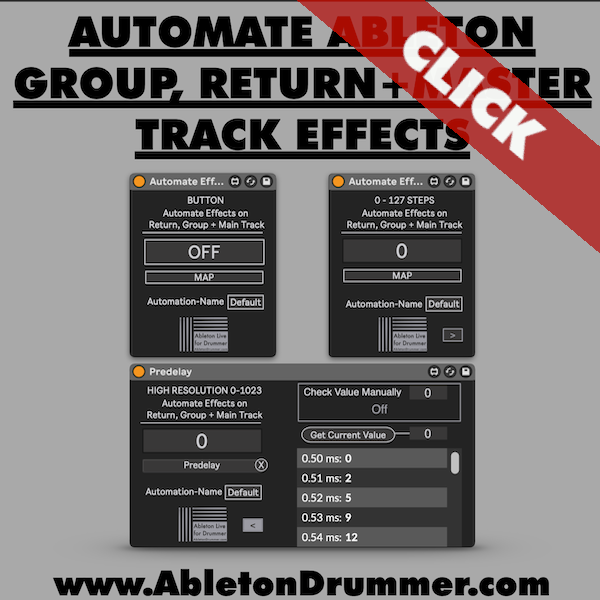
How to Automate Effects in Ableton Session View
Load one of the pack’s devices onto a standard MIDI track, click Map, then select the parameter you want to control on your group, return, or master track. The device captures the mapping and makes it available as an automatable parameter inside any MIDI clip on that track. Create dummy clips — one per scene — draw breakpoints in the clip envelope, and the parameter responds when each scene fires.
The Three Devices
Button Device: Toggles any effect on or off. Ideal for switching reverbs, delays, or entire Audio Effect Racks between scenes.
128-Step Value Device: Automates parameters across 0–127 steps — volume faders, send levels, or any MIDI controller-style value. Use the Get Current Value button to translate real parameter values into the correct step number.
High-Resolution Value Device: Extends the range to 1,024 steps for parameters that need finer accuracy — reverb decay times, filter frequencies, pre-delay. At this resolution, values like -6dB land within a fraction of a dB of the target.
Standard vs High-Resolution — When to Use Which
Standard resolution covers most performance scenarios cleanly. Switch to the high-res device when you’re targeting parameters with many internal steps, where 128 positions introduces audible rounding. Both devices follow identical setup steps — only the internal value scaling differs.
Automate Effects in Ableton Session View Across All Track Types
The dummy clip workflow is identical regardless of track type. The same devices and the same mapping approach apply to return track reverb parameters, master track limiters, or any effect on a group track submix.
Requirements
Ableton Live 10, 11, or 12 with Max for Live (included in Live Suite or available as an add-on for Live Standard).