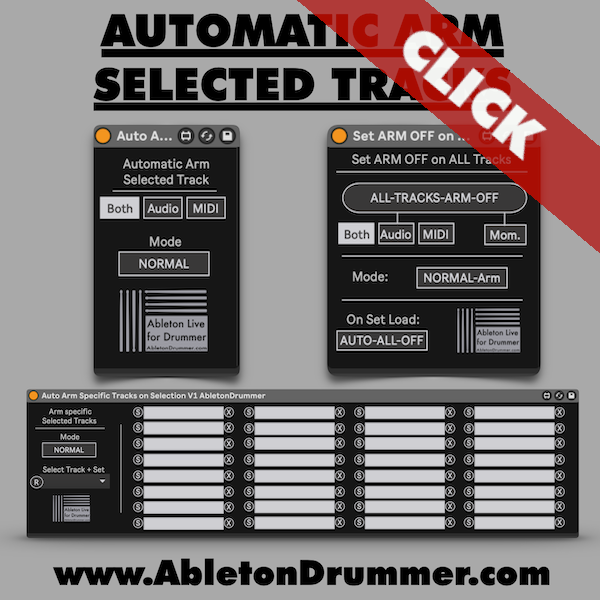
Ableton Live doesn’t arm a track just because you select it — you still have to hit the arm button manually every time you switch. The Automatic arm selected track pack fixes this with three Max for Live devices that handle the full range of arming scenarios, from simple auto-arming on selection to advanced implicit arming and per-track control.
How to Automatic ARM Selected Tracks in Ableton
Drop the core device into your set and it immediately arms whichever track you select — by mouse click or MIDI controller navigation, in both Session View and Arrangement View. A selector on the device lets you choose whether only Audio tracks, only MIDI tracks, or both respond to selection. This keeps arming predictable in live performance, where you may want instrument tracks to go hot without accidentally arming your audio tracks.
Implicit Arming — ARM Without Interruption
The device also supports Implicit Arm mode, Ableton’s alternative arming layer originally built for Push. It lets you keep certain tracks hard-armed at all times while using implicit arming to follow your navigation on others — without the two interfering. For example, a bass synth stays permanently armed while you move between lead synth tracks. Both arming modes are fully supported across all three devices in the pack.
Automatic ARM Selected Tracks in Ableton — Per-Track Control
When you don’t want every track to arm on selection, the Auto-Arm Specific Tracks device handles it precisely. Click Refresh to populate the track list, then select only the tracks that should respond to selection. All other tracks remain unaffected — useful for complex live sets where accidental arming would disrupt your signal routing.
Clear All Armed Tracks
The Set Arm Off on All Tracks device resets normal arming, implicit arming, or both with a single trigger. It also includes a “Turn All Arming Off on Set Load” option — so every time you open your set, armed tracks automatically clear. Useful for performers using the same set in rehearsal and on stage.
Requirements
Ableton Live 10, 11, or 12 with Max for Live (included in Live Suite or available as an add-on for Live Standard).