Ableton Live has no native way to change note pitch based on where you hit a controller — every hit from the same pad triggers the same note. The CC To Note Pitch Layers Pack V2 solves this with Max for Live devices that read incoming MIDI CC values and map them to pitch layers in real time. Hit lower on the surface and trigger root notes. Hit higher and shift up through a scale — no automation lanes, no mouse interaction.
How to Change Note Pitch via CC in Ableton Live
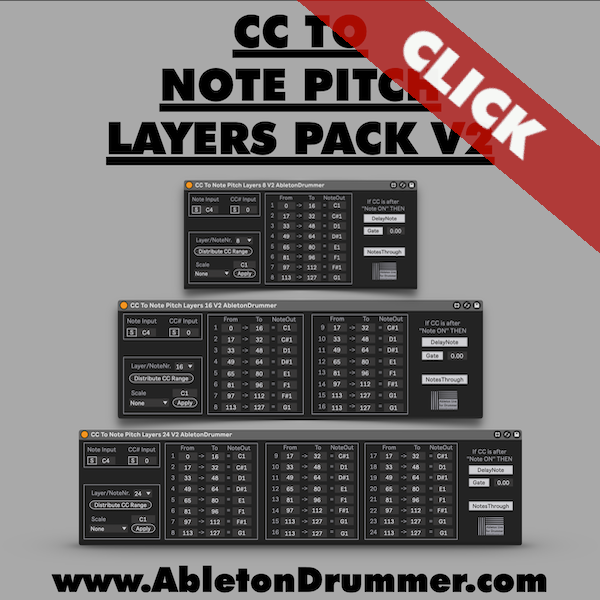
Your controller sends two types of MIDI data simultaneously: a note and a CC value reflecting hit position. Load one of the pack’s devices onto a MIDI track, press Sync, and hit your controller once. The device auto-detects both the note and CC number instantly — no manual entry needed. Then hit Distribute CC Range to divide the full 0–127 range evenly across your active pitch layers.
Applying a Scale
Select a root note, choose a scale type, and hit Apply. The device assigns the correct scale pitches across all layers automatically. Lower CC values trigger root notes, higher values move up through the scale — all driven by where you physically hit the surface.
8, 16, and 24-Layer Versions
The pack comes in three sizes to match the level of pitch resolution you need. The 8-layer version covers basic CC-to-pitch mapping cleanly. The 16 and 24-layer versions provide finer pitch granularity across the CC range for more expressive, step-dense playing.
Change Note Pitch via CC in Ableton Live — Advanced Options
Chain multiple devices on a single track to handle different note ranges and pitch zones independently. Use a second controller to send CC while the first triggers notes — route both into the same track and they work together. Combine with Ableton’s instruments and effects to build drone textures, melodic phrases, and experimental soundscapes driven entirely by physical movement.
Requirements
Ableton Live 10, 11, or 12 with Max for Live (included in Live Suite or available as an add-on for Live Standard). Any MIDI controller that sends both notes and positional CC data — such as the Drumbeam or Erae Touch.